

GitHub Actions example
This simple GitHub action workflow will deploy your Trigger.dev tasks when new code is pushed to themain branch and the trigger directory has changes in it.
Creating a Personal Access Token
1
Create a new access token
Go to your profile page and click on the “Personal Access
Tokens” tab.
2
Go to your repository on GitHub.
Click on ‘Settings’ -> ‘Secrets and variables’ -> ‘Actions’ -> ‘New repository secret’
3
Add the TRIGGER_ACCESS_TOKEN
Add the name 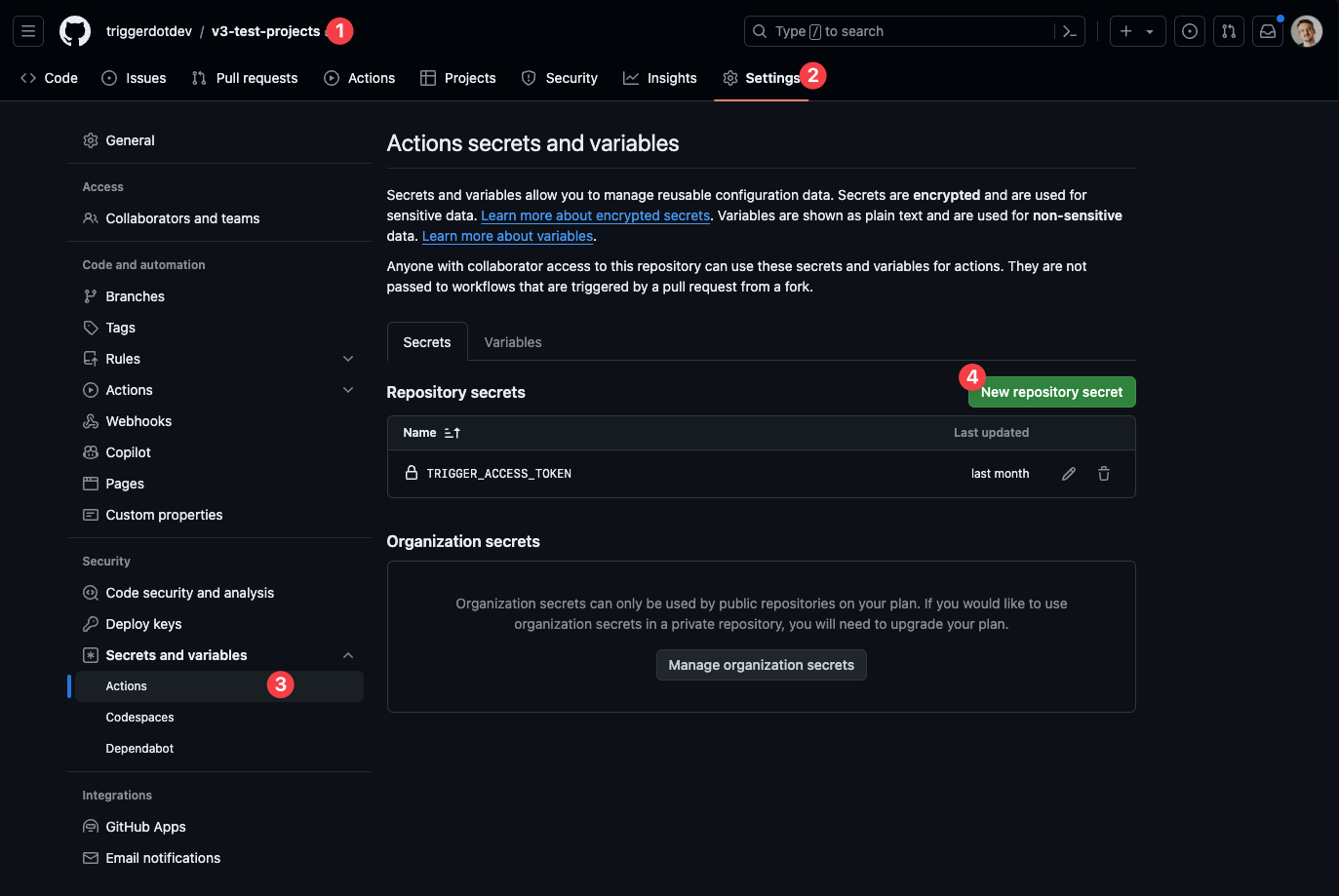
TRIGGER_ACCESS_TOKEN and the value of your access token. CLI Version pinning
The CLI and@trigger.dev/* package versions need to be in sync with the trigger.dev CLI, otherwise there will be errors and unpredictable behavior. Hence, the deploy command will automatically fail during CI on any version mismatches.
Tip: add the trigger.dev CLI to your devDependencies and the deploy command to your package.json file to keep versions managed in the same place. For example:
package.json script, like so:
.github/workflows/release-trigger.yml
--version to any command.
Self-hosting
When self-hosting, you need to:- Set up Docker Buildx in your CI environment for building images locally.
- Add your registry credentials to the GitHub secrets.
- Specify the
TRIGGER_API_URLenvironment variable pointing to your webapp domain, for example:https://trigger.example.com